Anyone looking to take any training on Tivoli Identity Manager 4.6 would be wise to get into these workshops available out here in Costa Mesa. Before attending the Basic Implementation workshop {Link}, I thought that maybe it wouldn't be a great use of my time since I've already implemented TIM in some sandbox capacity and participated in it's implementation in at least one development environment already. I figured now that I've actually done it how much more could I learn in a basic course. Furthermore, at a customer site we were already getting into some more heavy lifting with customization of the LDAP adapter and such. My being a training would mean I'd miss a week of that really goods stuff customizing an adapter.
My first day in Costa Mesa convinced me that taking the course was a good idea. First of all I should explain something. Any of these workshop courses are not done by Tivoli Education. They are done by the Tivoli enablement team. These are the people that get called out to a customer when either the customer themselves or a business partner screwed up. They are sort of rescue and recovery. This team is also as close as you can get to the people that actually write the code. So these folks teaching and developing the course material are people actually implementing it in some pretty complex cases. Another interesting point is that if the class says it is a workshop then it is this Tivoli Enablement team that is doing the class and it is also only available in Costa Mesa, CA. That's not to say that the other courses are not any good because even the enablement team will say that courses like Extending TIM are good ones to get. It's just nice to get training from people the caliber of our friend Ram Sreerangam.
The guy teaching this class is Brad Olive. He is the Workshop Manager and has been involved with Tivoli Identity Manager since almost the very beginning. Before IBM acquired the product it was called Access360. There was even two other companies before Access360. Brad goes back that far.
This class is hands on. So Brad talks about how the product gets deployed in the real world using some slides, then you quickly get to actual exercises. The cool thing is that you don't spend any time installing the products. They are already installed for you. The classroom time is spent configuring the products to work. The first day we built the org tree, fed users into the tree, configured a simple placement rule, provisioning policy and service, etc.... What was cool about Brad teaching this class is that if features of the system do not make sense to use he will tell you straight up not to use them. Here were some of his points:
1.) Service Selection Policy - The web courses talked about how great a feature this was. Brad admitted that yes the idea was really great, but unfortunately this feature has a slight problem. These Service Selection Policies get evaluated every time anything in the system changes. This could be a performance killer. Conclusion... avoid using them.
2.) Org Tree objects like Location and Business Partner are nice if you like the cute little pictures in the org tree to differentiate what they are, but in reality these can complicate your tree design and make things a little harder to find. Conclusion... use Organizational Units or Admin Domains instead.
3.) Static vs Dynamic Roles - It's fine to use both, but if you have many Dynamic Roles you can sometimes suffer some performance since these get re-evaluated a lot.
So even if you have installed TIM and configured it to some degree this is a good class to take. Obviously if you have already taken customers from development to production then this class may be a bit simple, however you would be surprised what you can learn from a basic class. Maybe some things you have been doing all along are now considered bad practice. Brad tells me these classes are constantly being updated to reflect real world practices, so if the enablement team has learned something new about the product along the way, they incorporate this into the class.
Tuesday, March 13, 2007

Saturday, March 3, 2007
Handy tool for your bag of tricks
My friend Thom Anderson turned me on to this tool a long time ago. I can't believe it took me this long to actually try it out. We are building TIM and TAM on a pSeries (AIX) box so there is no GUI like you get on the Linux environment. Some of the internal people use other products to help in managing their AIX systems. I really have little experience with AIX, but since we are installing on that platform we need an x windows environment to run the installs of TIM, WAS, TDS, TAM, etc.... Cygwin {link} is a pretty easy tool to install and configure. It looked a lot more complicated when Thom showed it to me a while back, but it's not a big deal at all. There is a another good web site that describes how to install it here {link} (thanks Andy) so it's pretty straight forward.
What I like about Cygwin is that I don't have to startup KDE or Gnome on my Linux system (saves some horsepower on my VMs) and I can still run all the software that requires x windows. For SLES 9 you will need to install the openSSH packages from Cygwin because Telnet is not enabled by default. Once you have installed the packages follow these steps to connect up to your Sles 9 machine:
1.) Launch Cygwin
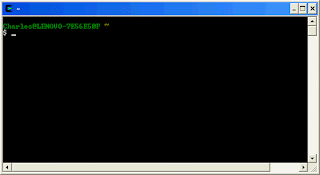 2.) Type startx
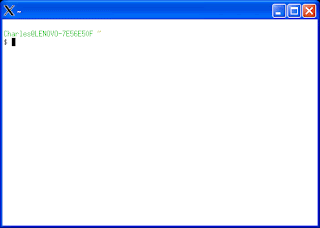 3.) To ssh to your linux machine, type:
ssh -Y -l
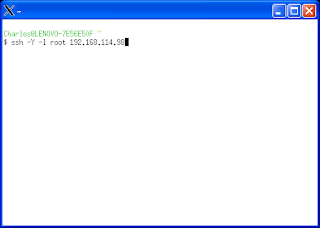 4.) From here you can launch any program that requires xwindows (I.e. TIM, TAM, TDS, WAS Graphical Installations, etc...)

What I like about Cygwin is that I don't have to startup KDE or Gnome on my Linux system (saves some horsepower on my VMs) and I can still run all the software that requires x windows. For SLES 9 you will need to install the openSSH packages from Cygwin because Telnet is not enabled by default. Once you have installed the packages follow these steps to connect up to your Sles 9 machine:
1.) Launch Cygwin
 2.) Type startx
 3.) To ssh to your linux machine, type:
ssh -Y -l
 4.) From here you can launch any program that requires xwindows (I.e. TIM, TAM, TDS, WAS Graphical Installations, etc...)
Things have been crazy...
Obviously there are these large gaps in time between my postings. Well lets just say that things have been crazy my first two weeks on the new job. The customer I'm working with right now has security policies in place which prevents me from posting to my blog during the day (and rightfully so) not to mention that when we are deep into configuration of TIM and TAM the last thing I'm thinking about is this blog. So the only time I can post is obviously after hours. Up until last Friday I didn't have a machine other than my home computer and since receiving the new computer I've spent most of my nights just installing all the software needed to build out my new sandbox for TIM/TAM. Whew!
I'm still looking for a new home for my blog. I thought I had something all lined up, but that has not materialized yet. I may actually have to switch from a Domino based blog to some free service like Blogger or something. In the meantime, I finally installed VMWare on my new machine and have built a new TIM server (Only took me 2 days this time) and now I'm just getting going on preparing a TAM server.
I was thinking (should have thought about this sooner) that if I hadn't already built my TIM server maybe it would have been better to build a DB2/TDS server to hold a single Instance with all the databases for TIM and TAM. In other words the TIM LDAP DB, TIM Transaction DB, and TAM User Registry DB all on one DB2 server in the same instance with TDS installed there to run both LDAPs. Then on a separate VM I could install just WAS and TIM and the DB2 Client to connect to the necessary DB2 databases. And then for TAM I would just install the TAM code pointing to the DB2/TDS server for it's LDAP. I'm not sure if this would have been a more efficient way to run a TIM/TAM environment on my Laptop or not. I have 80GB of space and 3GB or RAM so I'm just trying to maximize the horsepower I have. Either way, my TIM server is already done at this point:
host name: tim
OS: SLES 9
Disk: 10GB
Components:
TIM v4.6 FP33, IF38
TDS 6 FP3, IF2
DB2 v8.1 (Included with TIM TDS)
WAS 5.1 (with fixpacks included from TIM Suppl)
One thing I noticed when installing this was how fast my laptop performed. When I installed this on a Dell PowerEdge 2650 Server (loaded) I remember the WAS 5.1 install took soooo long (hours even) yet on ThinkPad T60p Core 2 Duo {Review} I blew through the install in under 15 minutes. Not sure how that could be, but I was pleasantly surprised. One thing I did differently in this case than the last time I built a sandbox is I used only one DB2 instance for both the TIM LDAP DB and the TIM Transaction DB. I wanted to limit the overhead as best as possible so instead of loading up two separate DB2 instances to do this I figured I would try with only one Instance containing both databases. Maybe you would or would not do this in production depending on the desires of your DB2 Admins and the hardware you are running on.
Next job to do is build out my TAM sandbox. That's what I'm working on the weekend in between other household duties. :-)
I'm still looking for a new home for my blog. I thought I had something all lined up, but that has not materialized yet. I may actually have to switch from a Domino based blog to some free service like Blogger or something. In the meantime, I finally installed VMWare on my new machine and have built a new TIM server (Only took me 2 days this time) and now I'm just getting going on preparing a TAM server.
I was thinking (should have thought about this sooner) that if I hadn't already built my TIM server maybe it would have been better to build a DB2/TDS server to hold a single Instance with all the databases for TIM and TAM. In other words the TIM LDAP DB, TIM Transaction DB, and TAM User Registry DB all on one DB2 server in the same instance with TDS installed there to run both LDAPs. Then on a separate VM I could install just WAS and TIM and the DB2 Client to connect to the necessary DB2 databases. And then for TAM I would just install the TAM code pointing to the DB2/TDS server for it's LDAP. I'm not sure if this would have been a more efficient way to run a TIM/TAM environment on my Laptop or not. I have 80GB of space and 3GB or RAM so I'm just trying to maximize the horsepower I have. Either way, my TIM server is already done at this point:
host name: tim
OS: SLES 9
Disk: 10GB
Components:
TIM v4.6 FP33, IF38
TDS 6 FP3, IF2
DB2 v8.1 (Included with TIM TDS)
WAS 5.1 (with fixpacks included from TIM Suppl)
One thing I noticed when installing this was how fast my laptop performed. When I installed this on a Dell PowerEdge 2650 Server (loaded) I remember the WAS 5.1 install took soooo long (hours even) yet on ThinkPad T60p Core 2 Duo {Review} I blew through the install in under 15 minutes. Not sure how that could be, but I was pleasantly surprised. One thing I did differently in this case than the last time I built a sandbox is I used only one DB2 instance for both the TIM LDAP DB and the TIM Transaction DB. I wanted to limit the overhead as best as possible so instead of loading up two separate DB2 instances to do this I figured I would try with only one Instance containing both databases. Maybe you would or would not do this in production depending on the desires of your DB2 Admins and the hardware you are running on.
Next job to do is build out my TAM sandbox. That's what I'm working on the weekend in between other household duties. :-)
Tuesday, February 20, 2007
DuPont Data Theft
I always say if you can't trust your IT staff then you've got a problem. Then again, it's not about trusting the people, it's more about trusting that the controls in place are enough to keep the honest people honest. Just like the locks on your doors. If someone really wants to break in badly enough then they will likely find a way, but if you leave the doors unlocked then maybe even an honest person will be tempted.
The DuPont thing {Link} is so sleazy a company really would have to be desperate to hire someone that stole so much data from his prior employer. I'm not saying that this guy Min's new employer new what he had done, but it's pretty strange that 4 months after signing on with the new employer he's still working for the competition. This is why Identity and Access management is so important. Only give people just enough access to applications they need to do their jobs and nothing more. But beyond Identity and Access Management, monitoring is critical for detecting such anomalies as mentioned in the DuPont story.
The DuPont thing {Link} is so sleazy a company really would have to be desperate to hire someone that stole so much data from his prior employer. I'm not saying that this guy Min's new employer new what he had done, but it's pretty strange that 4 months after signing on with the new employer he's still working for the competition. This is why Identity and Access management is so important. Only give people just enough access to applications they need to do their jobs and nothing more. But beyond Identity and Access Management, monitoring is critical for detecting such anomalies as mentioned in the DuPont story.
Crossed over to the other side...
So last week I was an IBM customer. This week I am an IBM Business Partner. Or another way of putting it I was a customer, now I'm a consultant. New role, new hat, new perspective on many things.
Day1:
My first day on the new job was your usual orientation type of thing. How to access the various HR and house keeping applications. How time is managed, who the important people are when you need help, etc.... It was a very productive day. One of the highlights was a fabulous Chinese restaurant P.F. Chang's China Bistro. Now usually I would prefer a local restaurant to a chain, but this was outstanding. Chang's Spicy Chicken was sooo good. Just melted in your mouth. They have these lettuce wraps with I think chicken or pork and you literally place the mixture in these little lettuce "cups" and wrap it up like a tortilla. Then we had the Pin Rice Noodle Soup which was awesome. It had a good kick to it, but not too much. The best part of P.F. Chang's is that you leave feeling satisfied, but not sick like I often do after eating from a typical fast food Chinese restaurant. I wish we had a P.F. Changs here in the Buffalo area. This is well worth it if you ever find one near by.
Day2:
Right into the fire, my second day was at a customer site. This is where I will likely be for quite a while aside from a bunch of scheduled training I have between now and July 1. So I hooked up with most of the project team from my company and partner companies along with some folks employed by the customer. Quite a team of people here. So far we are well into architecture with a Tivoli architect (ITIM) guy, a TAM guy (IBM), some project managers (our side, customer side) and an army of various technical and managerial folks. I'm shadowing for now to build on the experience and knowledge I already have and hopefully I'll be contributing during the implementation phase.
So off I go learning as much as I can about the needs of my new customer and how we will solve those needs with Tivoli software.
Day1:
My first day on the new job was your usual orientation type of thing. How to access the various HR and house keeping applications. How time is managed, who the important people are when you need help, etc.... It was a very productive day. One of the highlights was a fabulous Chinese restaurant P.F. Chang's China Bistro. Now usually I would prefer a local restaurant to a chain, but this was outstanding. Chang's Spicy Chicken was sooo good. Just melted in your mouth. They have these lettuce wraps with I think chicken or pork and you literally place the mixture in these little lettuce "cups" and wrap it up like a tortilla. Then we had the Pin Rice Noodle Soup which was awesome. It had a good kick to it, but not too much. The best part of P.F. Chang's is that you leave feeling satisfied, but not sick like I often do after eating from a typical fast food Chinese restaurant. I wish we had a P.F. Changs here in the Buffalo area. This is well worth it if you ever find one near by.
Day2:
Right into the fire, my second day was at a customer site. This is where I will likely be for quite a while aside from a bunch of scheduled training I have between now and July 1. So I hooked up with most of the project team from my company and partner companies along with some folks employed by the customer. Quite a team of people here. So far we are well into architecture with a Tivoli architect (ITIM) guy, a TAM guy (IBM), some project managers (our side, customer side) and an army of various technical and managerial folks. I'm shadowing for now to build on the experience and knowledge I already have and hopefully I'll be contributing during the implementation phase.
So off I go learning as much as I can about the needs of my new customer and how we will solve those needs with Tivoli software.
Thursday, February 15, 2007
Career move just a few days away...
Changing jobs is no small feat when you are leaving on good terms. My last day is tomorrow 2/16/07 and I've spent the last 2 weeks wrapping up the architecture phase of the Identity Management project here, trying to transfer knowledge, files, company owned gadgets, etc... to the people that need them. This is certainly a big job when you have accumulated 10 years of data and what not. Just updating everyone I know with my new contact information is a big job. I think I've worked 8:00am until Midnight for the last 2 weeks straight. I did take some time off this past Saturday to take the kids sledding though.
Some time ago I committed myself (no, not to an asylum) to Identity and Access Management. I took this plunge about 1.5 years ago when our organization wanted to build an enterprise LDAP which included the aggregation of identities from over 100 customer organizations each with slightly different technologies and standards for maintaining their user accounts. This was a big jump for me because I has spent the prior 7 or 8 years dedicated to Domino and a few before that to Novell. But this sounded like a great challenge so I started with Tivoli Directory Integrator (truly remarkable product in my opinion) to build assembly lines to connect to Novell, Active Directory, and Domino Directory servers pulling user accounts into Tivoli Directory Server. But, I said, "What about the users' passwords?". We can easily pull all these identities into an enterprise LDAP just fine, but we will ultimately be talking about over 200,000 users. How will we maintain a password policy? How will we convey to these users what their original name and password is and prompt them to change it after their first login? That's a job for Tivoli Identity Manager. Now to take a step back, why would we build this enterprise LDAP in the first place? WebSphere Portal and any portal delivered applications is the answer. So the primary driver for building the LDAP was to allow all of these users to login and access applications we intend to roll out. Early on we knew that TIM and TAM would be required so when we finally purchased that software and started to install and play around with it, a few things became clear to me:
1.) I had a lot more to learn about the Tivoli software
2.) This project was going to be a long and hard one
Both of these things spell challenge to me and I really love a challenge. So I committed to learning all I can about TIM, TAM, TDS, and the various ways to deal with Identity Management.. But to become an expert in this field will require something more than I can get by staying here in this job. As much as I loved my current position, it's going to take a different type of job for me to really learn this stuff. Alas, I am leaving my role in K-12 education and joining IBM Premium Business Partner Strategic Computer Solutions, Inc. out of Syracuse, NY. With this new position, I'll be on an accelerated pace of learning and I'll be exposed to more experts in the field than if I stayed here. I anticipate the change to be a positive career move which should enable me to make a difference in many more ways down the road. I'm psyched about the new opportunity and look forward to adding value to the Tivoli brand and of course the SCS team.
So, I'm working on moving this blog so that I can continue posting my experiences with the Tivoli Security software along the way. Hopefully my postings will somehow help someone else who has to go through the same learning curve I am going through. And since there aren't really any bloggers out there for TIM and TAM, hey it's something new to talk about. OK, not exactly as exciting as Notes and Domino, but middleware is not all that glamorous. So what.
Some time ago I committed myself (no, not to an asylum) to Identity and Access Management. I took this plunge about 1.5 years ago when our organization wanted to build an enterprise LDAP which included the aggregation of identities from over 100 customer organizations each with slightly different technologies and standards for maintaining their user accounts. This was a big jump for me because I has spent the prior 7 or 8 years dedicated to Domino and a few before that to Novell. But this sounded like a great challenge so I started with Tivoli Directory Integrator (truly remarkable product in my opinion) to build assembly lines to connect to Novell, Active Directory, and Domino Directory servers pulling user accounts into Tivoli Directory Server. But, I said, "What about the users' passwords?". We can easily pull all these identities into an enterprise LDAP just fine, but we will ultimately be talking about over 200,000 users. How will we maintain a password policy? How will we convey to these users what their original name and password is and prompt them to change it after their first login? That's a job for Tivoli Identity Manager. Now to take a step back, why would we build this enterprise LDAP in the first place? WebSphere Portal and any portal delivered applications is the answer. So the primary driver for building the LDAP was to allow all of these users to login and access applications we intend to roll out. Early on we knew that TIM and TAM would be required so when we finally purchased that software and started to install and play around with it, a few things became clear to me:
1.) I had a lot more to learn about the Tivoli software
2.) This project was going to be a long and hard one
Both of these things spell challenge to me and I really love a challenge. So I committed to learning all I can about TIM, TAM, TDS, and the various ways to deal with Identity Management.. But to become an expert in this field will require something more than I can get by staying here in this job. As much as I loved my current position, it's going to take a different type of job for me to really learn this stuff. Alas, I am leaving my role in K-12 education and joining IBM Premium Business Partner Strategic Computer Solutions, Inc. out of Syracuse, NY. With this new position, I'll be on an accelerated pace of learning and I'll be exposed to more experts in the field than if I stayed here. I anticipate the change to be a positive career move which should enable me to make a difference in many more ways down the road. I'm psyched about the new opportunity and look forward to adding value to the Tivoli brand and of course the SCS team.
So, I'm working on moving this blog so that I can continue posting my experiences with the Tivoli Security software along the way. Hopefully my postings will somehow help someone else who has to go through the same learning curve I am going through. And since there aren't really any bloggers out there for TIM and TAM, hey it's something new to talk about. OK, not exactly as exciting as Notes and Domino, but middleware is not all that glamorous. So what.
Monday, February 5, 2007
VA déjà vu
It happens again and again. People's identity data is compromised by the loss of a computer, hard drive or some system gets hacked. In fact for the VA this is tragically the second time in only months. See Computerworld {Link}. It's just unbelievable to me that these employees need to work with thousands of records on a local drive for any reason. First of all the article isn't clear how many records were compromised. Is it 48,000 or 20,000? I wish these articles would explain why these records were on an external hard drive in the first place. What project could this person been working on where he/she could not access the records as needed from a secured database or something? Why aren't the records on a server in a locked data center? Going back to May 2006 why was an employee carrying around 26 million records on a lap top? Now that would be helpful information in the article.
When I hear about these breaches it makes me stop and think about the project I've been involved in for the last 2 years and the projects coming up where I'll be dealing with employee identity data. When developing a TDI assembly line to pull user attributes from one system to another it's very common to test it with simple CSV or flat files for the source or destination of that data. I remember developing an assembly line to read thousands of users from one system and write the records to an LDAP. To test this I would first output the data to a file. This testing might occur many times over and over. These files may end up on various directories of my computer (lap top) which undoubtedly would go home with me at night. Maybe I'll stop at the Gym on the way home or the grocery store. Next thing you know my car gets broken into and I'm the next cause of a security breach at my company.
Well luckily I don't keep these files on my lap top really. Also lucky for me I don't happen to be dealing with personal information. But these security breaches have to make you stop and think if you are like me and happen to deal identity data from time to time. I guess the simple lesson is don't keep information like this on your machine. Make up a pile of bogus users if you have to test your assembly lines. If you need to test with real users do it on a secured machine that won't be sitting on the back seat of your car after 5:00pm.
When I hear about these breaches it makes me stop and think about the project I've been involved in for the last 2 years and the projects coming up where I'll be dealing with employee identity data. When developing a TDI assembly line to pull user attributes from one system to another it's very common to test it with simple CSV or flat files for the source or destination of that data. I remember developing an assembly line to read thousands of users from one system and write the records to an LDAP. To test this I would first output the data to a file. This testing might occur many times over and over. These files may end up on various directories of my computer (lap top) which undoubtedly would go home with me at night. Maybe I'll stop at the Gym on the way home or the grocery store. Next thing you know my car gets broken into and I'm the next cause of a security breach at my company.
Well luckily I don't keep these files on my lap top really. Also lucky for me I don't happen to be dealing with personal information. But these security breaches have to make you stop and think if you are like me and happen to deal identity data from time to time. I guess the simple lesson is don't keep information like this on your machine. Make up a pile of bogus users if you have to test your assembly lines. If you need to test with real users do it on a secured machine that won't be sitting on the back seat of your car after 5:00pm.
Subscribe to:
Posts (Atom)