Tuesday, November 20, 2007

Synchronizing Global Agent Settings can break synchronization???

Just because you can do something doesn’t always mean you should. One of the Tivoli Level 2 support guys from IBM warned me that synchronizing your Global Agent Settings to the repository can lead to issues such as synchronization problems. So synchronizing can cause synchronization problems. Go figure. I guess I won’t do that then.


· Just right-click the object (vgoadminoverride in my case) and click delete


Corrupt TAM eSSO User...

"There was an error trying to load your chosen primary logon method. You may want to reinstall it in order to correct this."

I have a workstation in which 4 or 5 different users will logon to. All the users except one worked fine. The problem user would login to the Windows Domain and the above error would be displayed as soon as the TAM agent would start to load. To fix this problem I followed these steps.

1.) Logon to the Admin workstation and clean up the server side by deleting the users credential objects
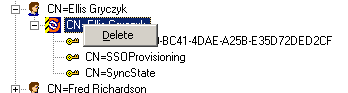


· TAM eSSO Admin Console -> AD Repository -> Twist Open Users Container -> Twist Open User

· Right-click TAM eSSO object -> Delete


1.)
Next, logon to the users workstation and cleanup the agent side
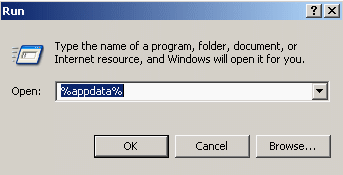


· Start -> Run -> %appdata%



· Delete the Passlogix folder


· Start -> Run -> Regedit

· Delete the Passlogix folder from HKEY_CURRENT_USER\Software\

· In this case it was also necessary for me to delete the folder in the %appdata%\Microsoft\Crypto\RSA folder. There is normally a single file in this folder, but since this problem had something to do with the logon method it was necessary to delete this folder as well.
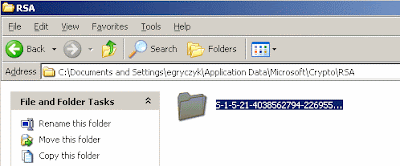


3.) Finally, log off Windows and log back on. TAM eSSO should start correctly.

Tuesday, November 13, 2007

LDAP Adapter Gotcha...

The Problem: CTGIMD014I 1 reconciliation entries were not processed for the following accounts: eruid=users.

I had this problem on one of my TIM servers. It was relatively early on in the build process for this environment and I had created a service for an LDAP which I was to be provisioning user accounts. Really straight forward stuff here. But, I kept having these recon warnings. The Reconciliation would complete with the warning noted in the title of this post. The trace.log showed several errors like this one:

*********** ENTRY **********
$dn: DN:eruid=users
erLdapContainerName: dc=mydomain,dc=com
objectclass: OBJ:erLDAPUserAccount
cn: users
eruid: users
erAccountStatus: 1
*********** ENTRY END ******

![CDATA[Unable to create orphaned account]]

![CDATA[Thread 2 Encountered an exception processing eruid=users: CTGIMS001E At least one required attribute is missing.]]

So ITIM was trying to orphan a bunch of accounts and it came across an account called "users". Well the reason for this apparently is because of the fact that I had created a container in my target LDAP called cn=users. I had provisioned my LDAP users into this container. The LDAP Adapter apparently has a problem with the search base being cn=users,dc=mydomain,dc=com.

The Fix:

To fix this I simply re-created the users container as an OU. So I deleted the users from the cn=users container, then deleted the container and re-created it as an OU. I changed the search base on the service and now everything works fine.

I know that typically containers such as cn=something are usually seen more often in AD, but ITDS had no problem letting me create these. Technically for my solution it really makes no difference so it was easy enough to just blow away the containers and re-create them as OU's. Just a little gotcha with the LDAP Adapter I guess. BTW, IBM Tech support caught this very quickly where I just didn't see it. Thanks Melvin!

Wednesday, October 31, 2007

Tivoli Directory Integrator - One very cool software product

One of the favorite products of many Tivoli security professionals is Tivoli Directory Integrator. I have to say it's one of the coolest software products I've ever worked with. IBM currently ships it with a number of other products including one of my past passions Lotus Domino.

Anyhow if you are new to Tivoli there's a great wiki here: http://www.tdi-users.org/twiki/bin/view/Integrator/WebHome


Also finally I'm not the only one blogging about Tivoli thanks to Eddie's new ITDI blog. At least now there's someone who really knows what they're blogging about:

http://tdiingoutloud.blogspot.com/

Wednesday, October 3, 2007

Helpful Tivoli Webcasts

There are some pretty good technical webcasts available on IBM's Tivoli Support site:

http://www-306.ibm.com/software/sysmgmt/products/support/supp_tech_exch.html

If you haven't already found these they are a bit helpful for those topics you are new to in the Tivoli software. Some are very broad in scope and others are fairly granular. Check these out if you haven't already. I try to visit this site a couple times per month to register for the upcomming webcasts. Whats nice about joining a live webcast is that you can ask relevant questions at that time. All the old ones are posted.

Friday, July 20, 2007

Troubleshooting AD Agent - Unable to set some attributes

When you provision users to AD and you have chosen to set attributes from the Terminal Server tab you may encounter warnings instead of success when viewing completed requests.

The audit log may say it could not set some attributes such as Allow Logon. In my testing it would occasionally complain about not being able to set other attributes related to Terminal Services as well.

If you go to your AD Agent on the AD server and enable detailed logging you may see something like this:

errorMessage="Error setting attribute eradwtsallowlogon. Agent Terminal Server support disabled.">

This is the first clue to the problem. Simply run the agentCfg tool and choose option F. Registry Settings, then option A. Modify non-encrypted registry settings, page down using option D. then set WtsEnabled to 'TRUE'.


Try again to provision your users and this time I think you will have more success.

Monday, July 16, 2007

The InstallScript engine is missing from this machine...

If available, please run ISScript.msi, or contact your support personnel for further assistance.


If you are installing the TAM ESSO agent and encounter this message, then it is likely that you are using an older version of ISScript.msi than is required.

I ran into this problem recently and spent a few hours trying to install various versions of ISScript.msi. There is an informative tech note from InstallShield here:

http://consumer.installshield.com/kb.asp?id=Q108158

The problem is that if you try to install any or all of the versions mentioned in the technote you will still get the error message because InstallShield is already up to like version 12 or there abouts.

You can debug your msi by running this from the command line:

msiexec /i yourmsi.msi /l*v C:\Temp\MyMSILog.log

In the log you will see which version of isscript.msi it's trying to use. That would be the version you must install.

Since I'm using TAM ESSO 6.004 it is requiring version 11.5 of isscript.msi. I found the correct version of isscript.msi bundled with the TAM ESSO 6.004 product. You will find it in the Utility folder. The file name is isscript1150.msi.